Nuqta

Jordanian point of sale · Windows

Your shop keeps running

The internet drops, the power comes back, and no monthly bill locks you out. Nuqta keeps selling on your machine — and your invoices reach the tax department when the connection returns, and come back accepted.

Installs on your machine. Your data stays with you, not in a cloud.

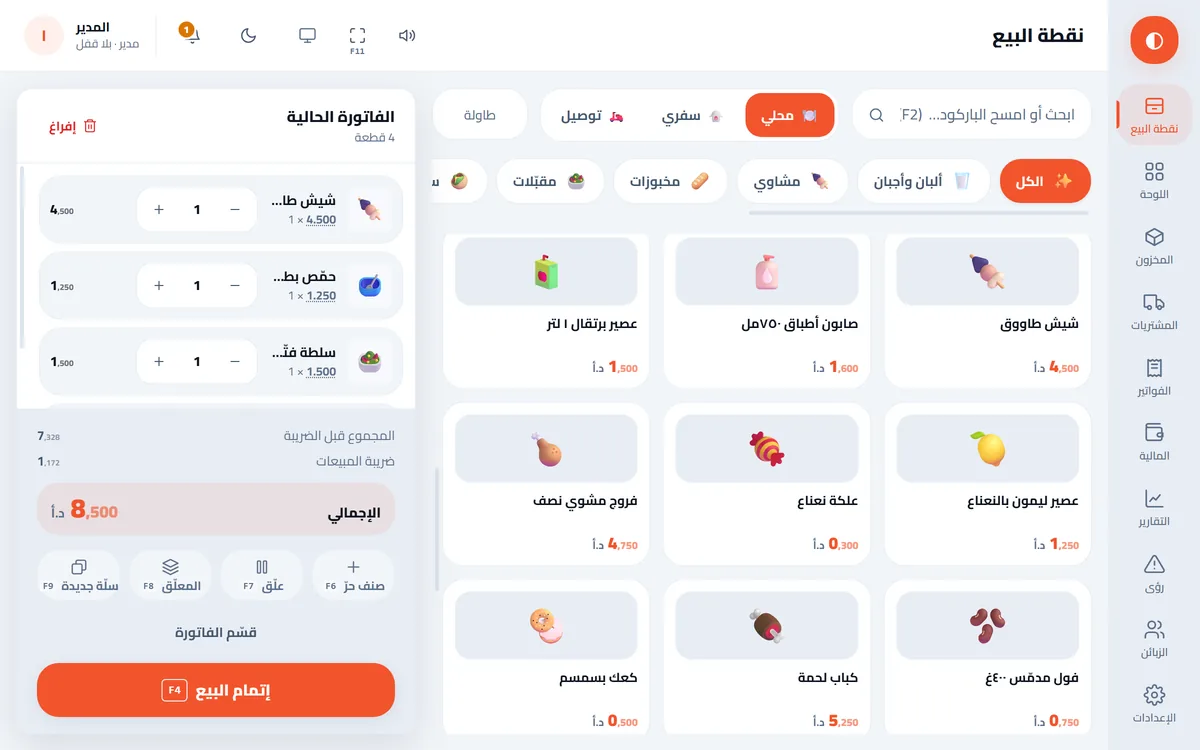
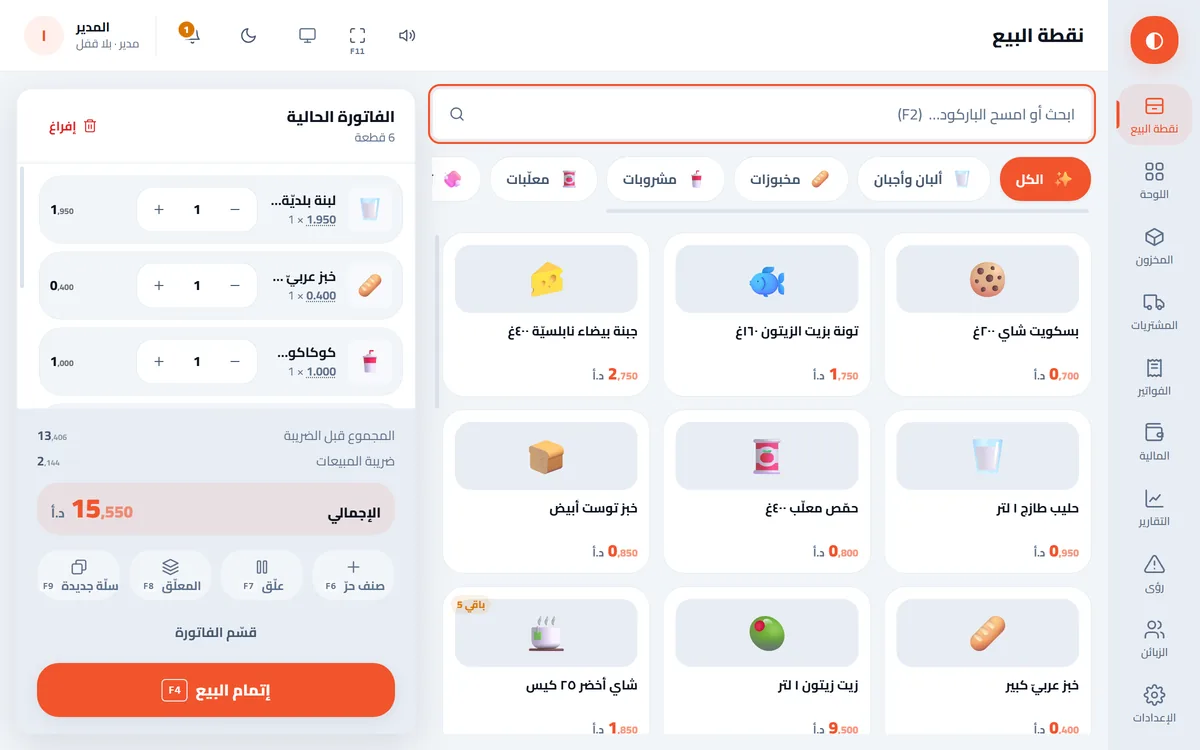
The Nuqta sell screen: a cart with six items, a 15.550 JD total, and the item grid by category
The sell screen exactly as it is in the app — not a mock-up.
Sanabel Grocery
Tax invoice · 2026/08/12 · 19:42
Invoice no: INV-000184
Cashier: Ahmad
Labneh 500g2.450
Arabic bread, large0.500
Coca-Cola 1.5L1.100
White cheese 400g3.200
Crisps x 31.500
Total8.750
Tax included, 16%1.207
Cash10.000
Change1.250

Submitting to the department… Accepted by the department

This is how your invoice prints — and how it comes back accepted.

The shop and items are an example. Prices include tax, as the Jordanian market expects.

  • 14tax rules proven by actual acceptance
  • 910money cases checked on both sides before every release
  • 4trades that reshape the whole app
  • 0monthly subscription — you buy it once

You pay once, you own it for life, your data stays on your device, and it keeps selling when the internet drops


Why Nuqta

You own it; it does not own you

For life

Yours for life

You pay once and the software is yours. No monthly subscription, no forced renewal fees, and nobody shuts your shop if you are late on a payment. Updates are free in the first year and optional after that; if you do not renew, your software keeps working as it is.
Your data, your machine

Everything on your machine

Items, invoices, customers and accounts all live in a database on your computer, and your backups on your disk. No cloud, no account to open, no analytics, no tracking. Only two things ever leave the machine: your invoice to the tax department, a legal requirement, and your device fingerprint and version number to the licence server to verify your licence. No customer name, amount or item is sent with it.

Never stops

Works offline

Internet down, or the power just came back? Selling continues for up to 21 consecutive days without a connection. Invoices wait in the queue and reach the department on their own when the line returns, and not one is lost.


What the software does

Not just invoicing — a complete system for running the shop

Everything below is built and working today. There is no "coming soon".

  • 54screens
  • 22ready reports
  • 18permissions
  • 51data tables

A fast sell screen

10supported tax rates

Built for a cashier in a hurry, not an accountant.

  • Barcodes
  • A scale that reads weight and price off the label
  • Park invoices
  • Split one bill across customers
  • Cash + card + CliQ on one invoice
  • Offers and discounts
  • Line price override with permission
  • Shelf prices include tax
The Nuqta sell screen: a cart with six items, a 15.550 JD total, and the item grid by category

Stock and purchasing

From the purchase order to the label on the shelf.

  • Weighted-average cost
  • Suppliers, POs and partial receipt
  • Returns to supplier
  • Counts and adjustments with reasons
  • Size x colour variants in one pass
  • Device serial numbers
  • Excel import with preview
  • Barcode label printing
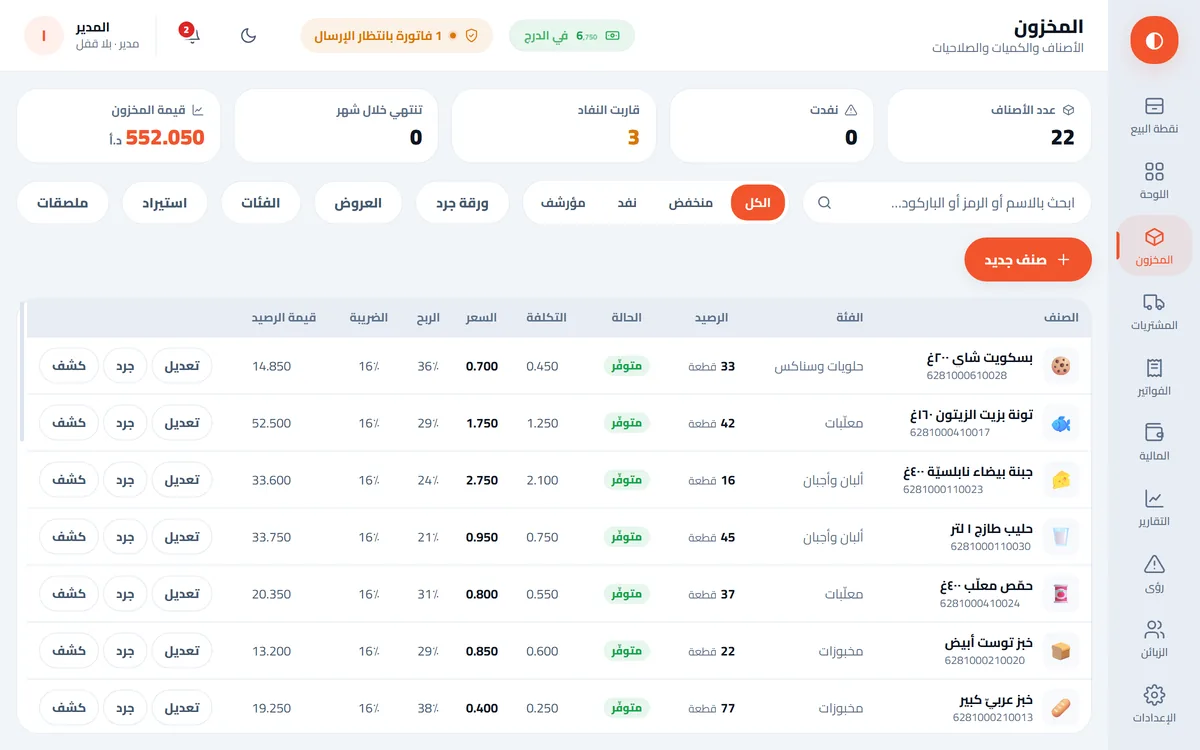
Inventory with items and variants

Till and shifts

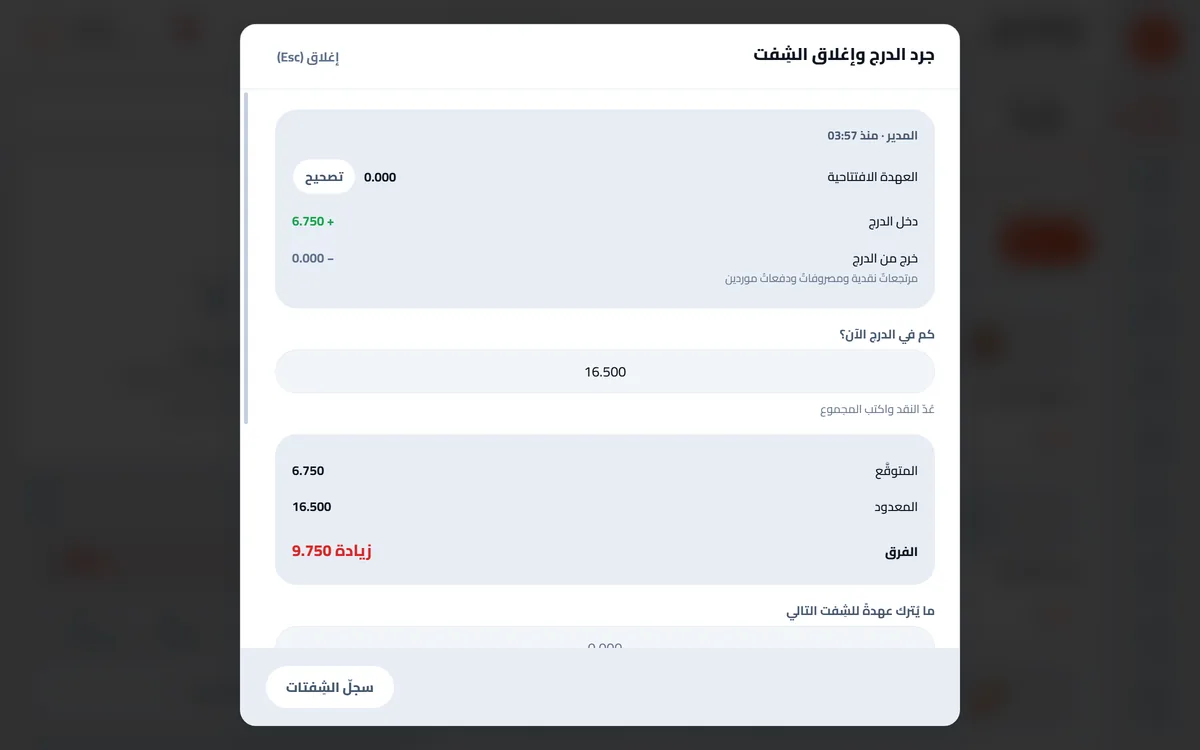
The difference is posted, not swallowed.

  • Till count from the ledger, not summed invoices
  • Shift handover with a code
  • Owner draw · bank deposit · expense
Till count and shift close

Customers and receivables

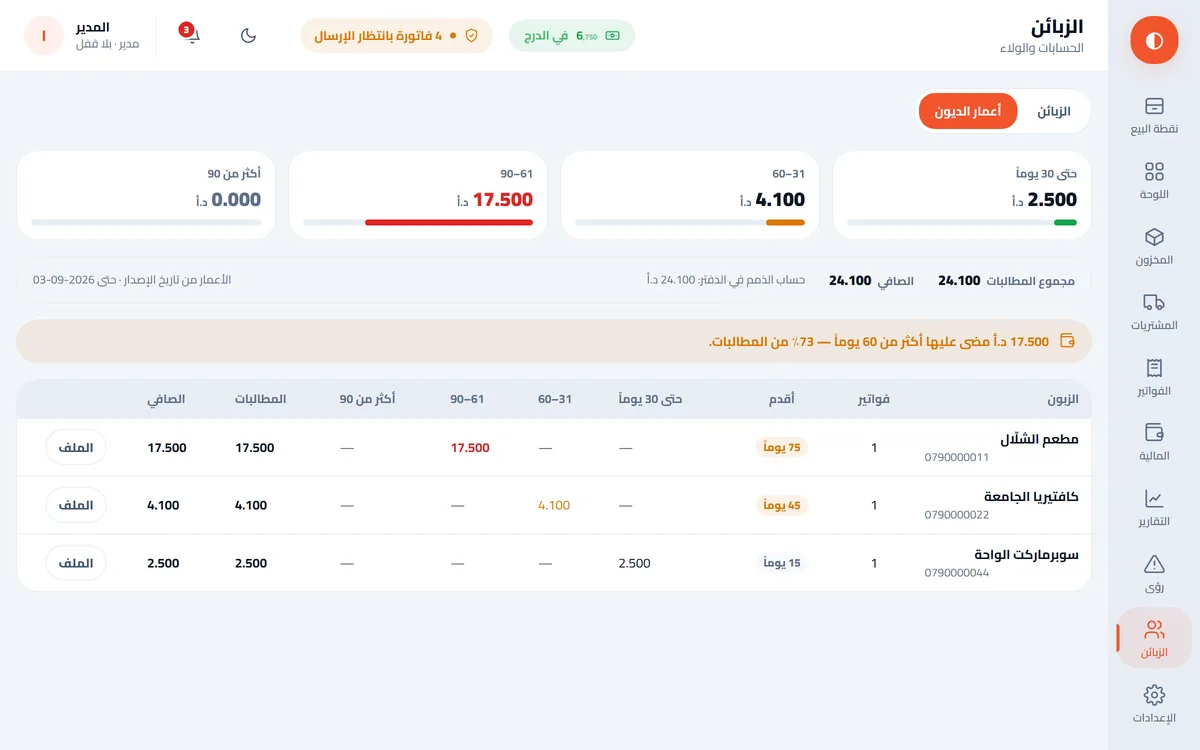
Who owes, how much, since when.

  • Statements
  • Ageing 30/60/90
  • Receipts allocated to invoices
  • Points loyalty with a ledger
The customers screen: a statement of account and 30/60/90-day ageing

Security and control

18independent permissions

You know who did what, and when — and catch the theft a stock count misses.

  • Users and roles
  • Permissions checked in the core, not the screen
  • Activity log with day, hour and who
  • Supervisor-authorised voids on the same screen
  • Void report per employee
  • Maker-checker approval
Activity log: who did what and when

Restaurants and cafes

The order reaches the kitchen without prices.

  • Tables and order types
  • Priced modifiers: "extra cheese", "no sugar"
  • Kitchen ticket to a second printer
  • A resend says so on the ticket
Restaurant screen: tables and kitchen ticket

Phone repairs

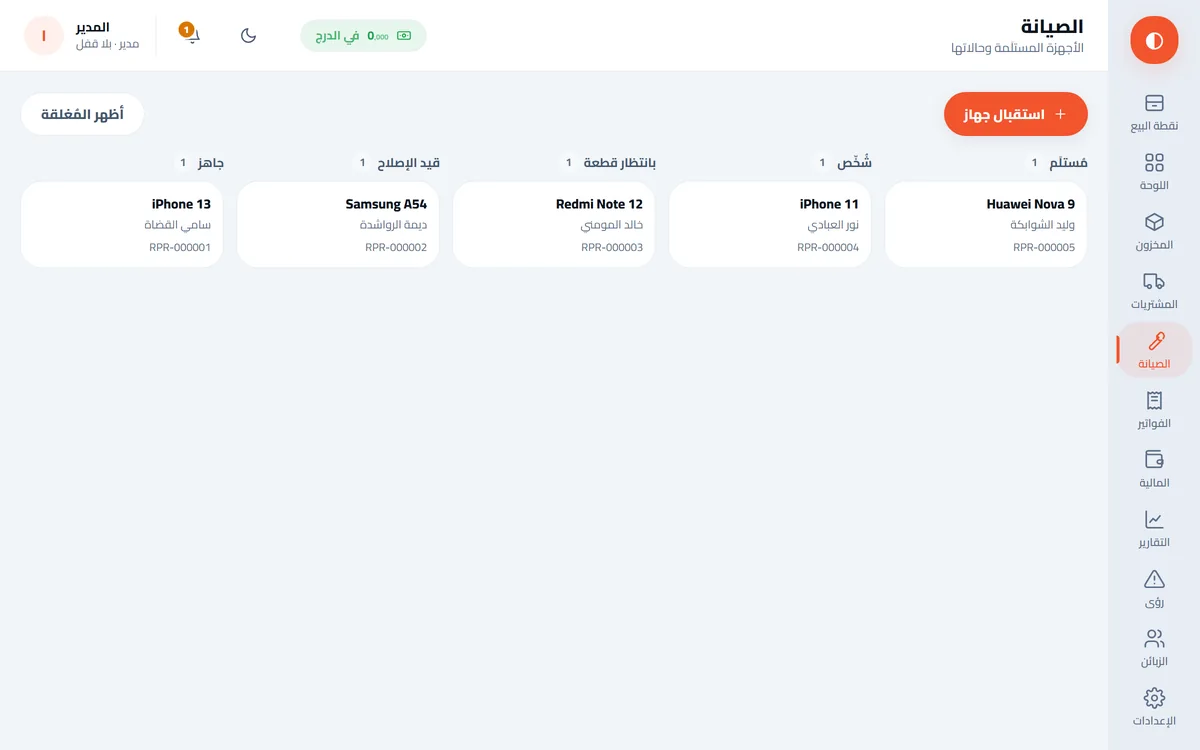
7states that never skip

No device is handed back that nobody opened.

  • Spare parts on the ticket
  • Serial numbers
  • Handover issues the invoice
  • Warranty without an invoice
The repairs screen: device tickets by state, from intake to handover

Real double-entry accounting

910money cases checked on both sides

Not a "sales report" — a full ledger.

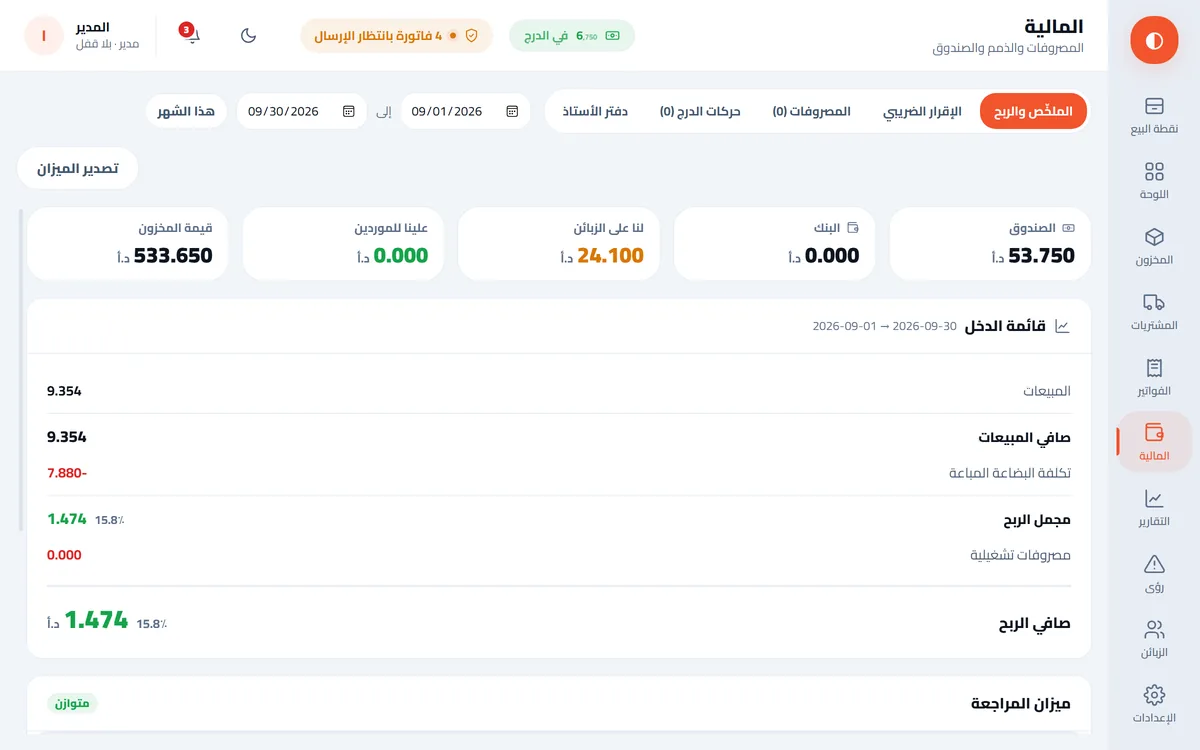
  • Income statement, trial balance and tax return from the entries
  • Logic taken from ERPNext
  • Every amount an integer in fils
  • Payment and receipt vouchers
  • Incoming cheques with collection
The accounting screen: trial balance and income statement from ledger entries

Reports and Insights

22ready reports

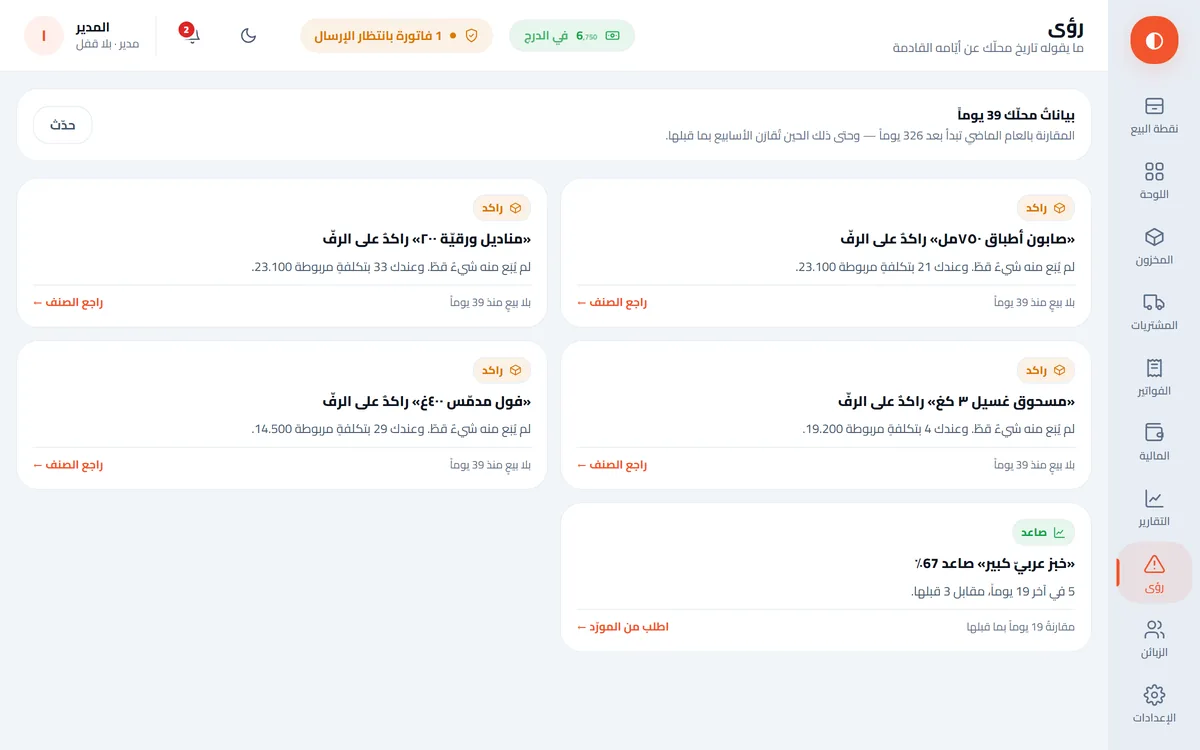
It reads your shop history and tells you what you did not think to ask.

  • Sales, profit, peak hours, top items
  • Sales forecasting
  • Dead stock eating your money
  • An item about to run out before the season
  • A rise in demand
The Insights screen: five observations about the shop, slow stock and a rising item

Backup and migration

Every backup is verified before it counts.

  • Automatic daily backup
  • Move the whole shop in one file
  • Excel export with correct types — no 6.29E+12 barcodes

Printing

Arabic comes out properly joined.

  • ESC/POS thermal printers
  • Customer display
  • Cash drawer
  • Barcode labels

National e-invoicing

14rules proven by acceptance

Reaches the department and comes back accepted.

  • A queue that never drops an invoice
  • No false success
  • The department's code, not ours
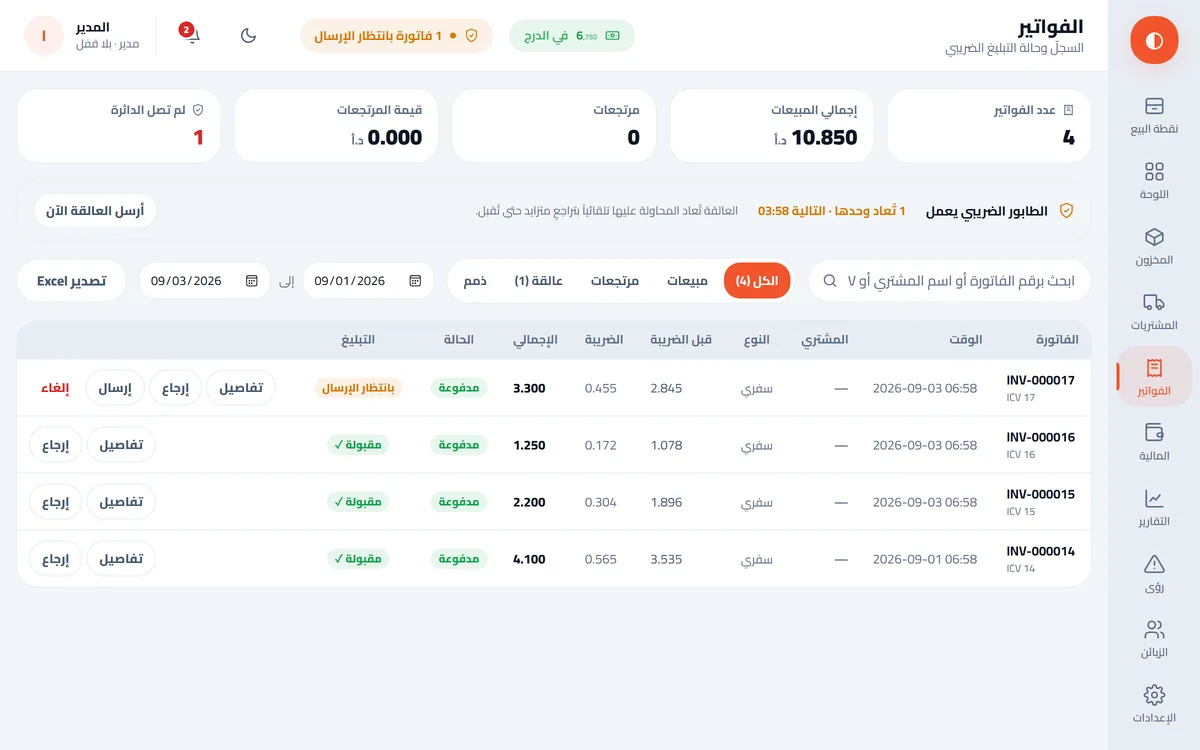
The invoices screen: one invoice accepted by the department, one waiting, with a Send button

One trade reshapes the whole app

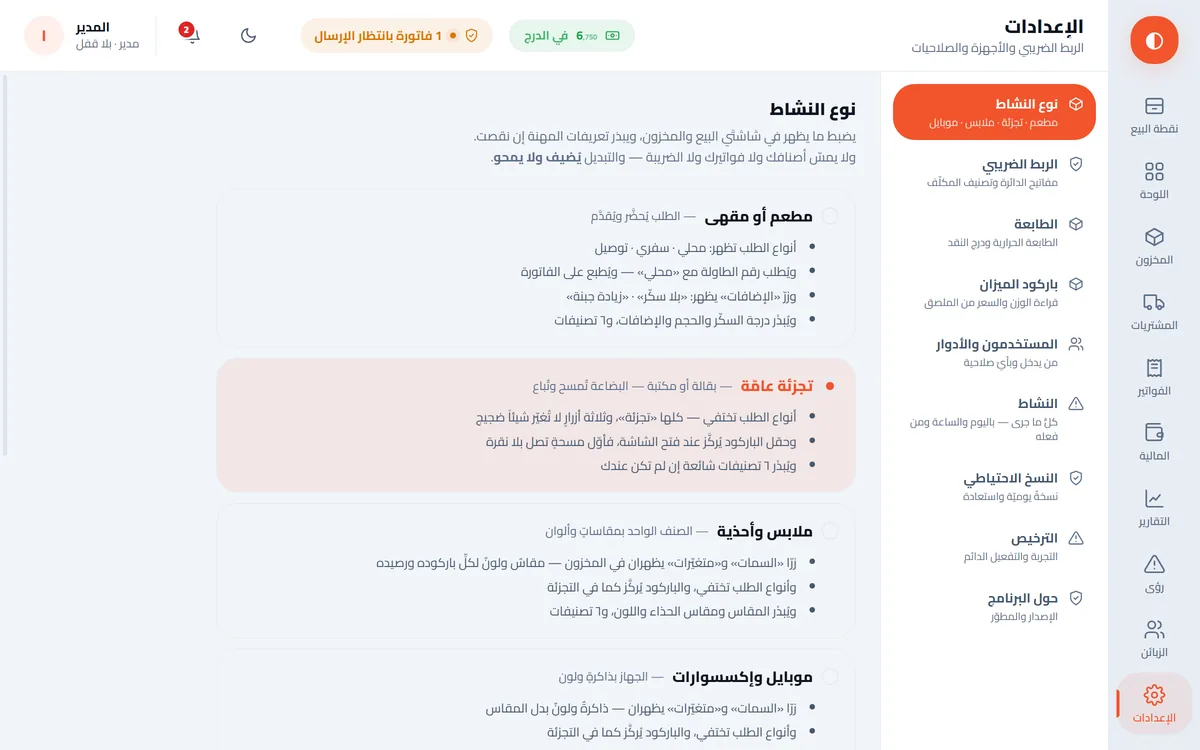
4trades

Unrelated screens are never rendered.

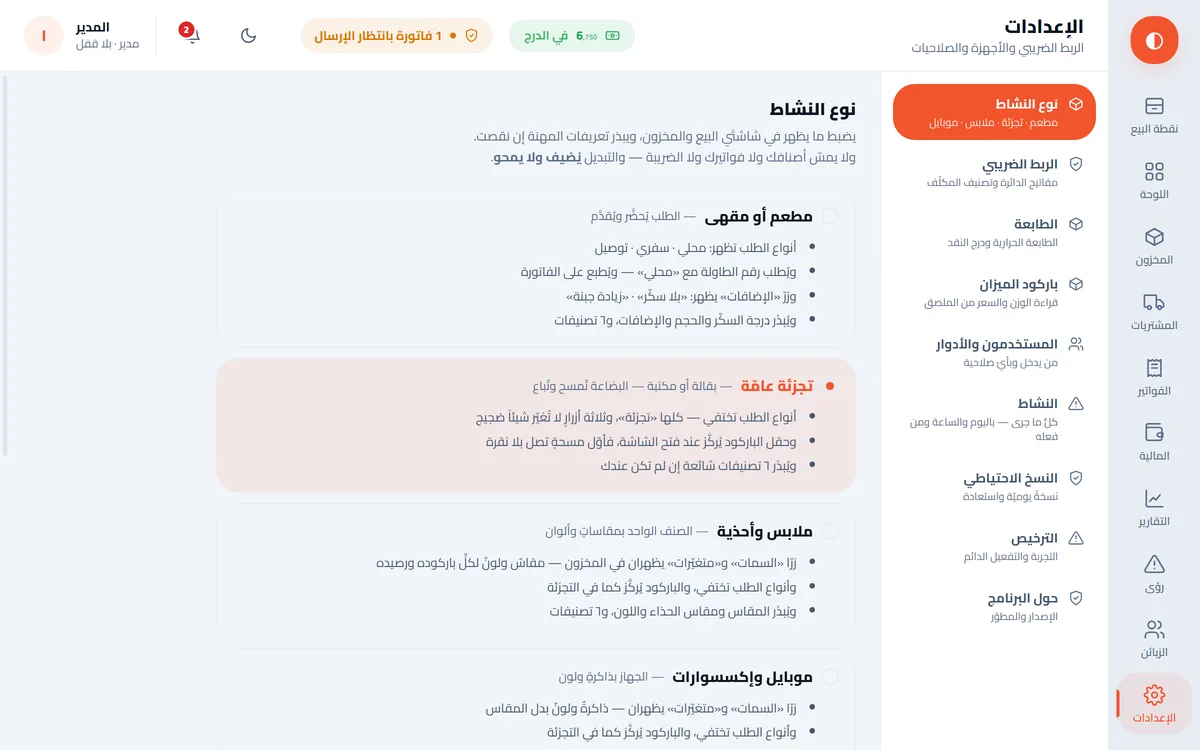
  • Restaurant or cafe
  • General retail
  • Clothing and footwear
  • Mobile and accessories
Settings: choosing one of four trades

Light on the machine

4.2MB installer

One small installer, and you start.

  • Windows 10+ · 64-bit
  • No .NET
  • Installer in Arabic and English
  • Your data in one file on your machine
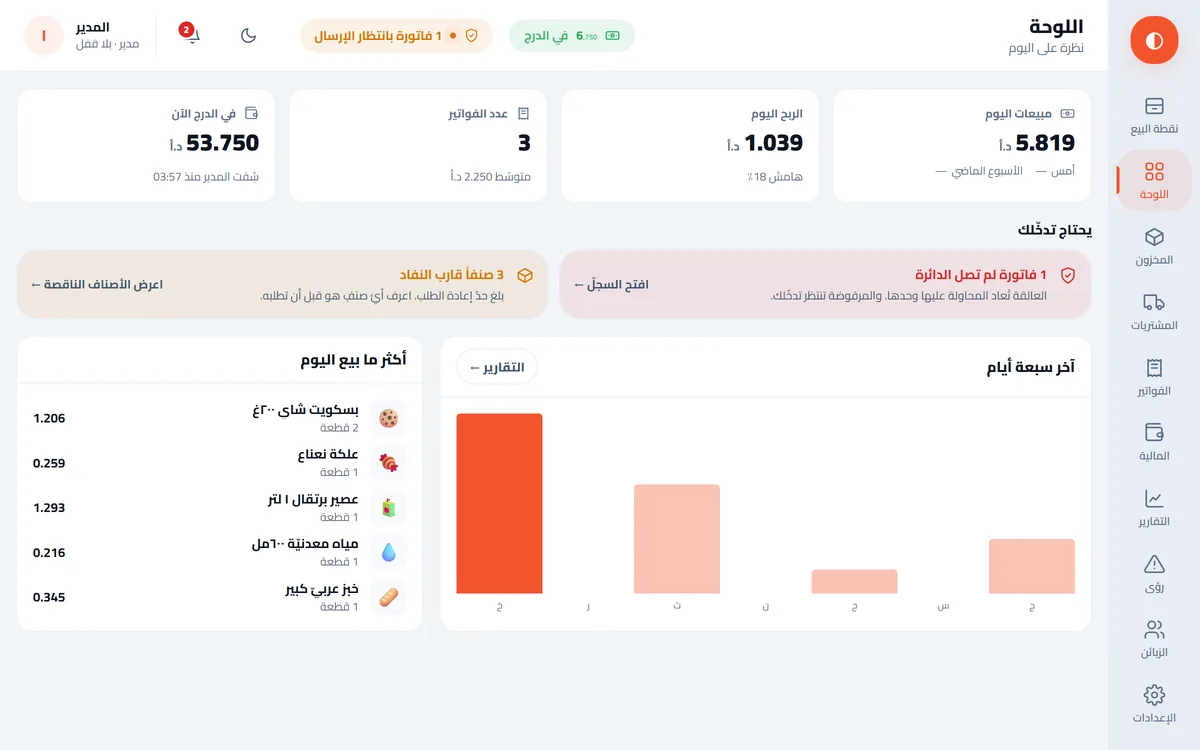
The main dashboard

Every feature in detail →


National e-invoicing

Your invoices reach the department — and come back accepted

National e-invoicing is now mandatory. Most systems either do not support it, or support it partially — so the invoice arrives, comes back rejected, and you spend your day chasing it.

  1. You sell

    The invoice is saved on your machine first.

  2. The document builds

    A complete UBL 2.1 document, to the department rules.

  3. It is submitted

    And if the line is down it waits in the queue and retries itself.

  4. It comes back accepted

    With the department signed code — theirs, not ours.

The only step that pauses when the internet drops is the third — and it does not stop, it waits.

The invoices screen: one invoice accepted by the department, one waiting, with a Send button

14 rules, each one paid for by a rejection

These were not read from a manual — each rule became known because the department rejected an invoice first. Proven by actual acceptance, not by documentation.

The queue never drops an invoice

Line down? The invoice waits in the queue and retries on its own, backing off between attempts until it lands. Nothing for you to do.

No false success

The word "accepted" is never written unless the department said it. And we never generate a QR code locally — a code of our own making prints a paper that looks official and is not.

You must be registered with the department first

Nuqta does not replace registering on the national e-invoicing platform. You register with the Income and Sales Tax Department, receive your credentials, and enter them in the app once — there is a button that tests the connection before your first sale. After that the app handles the rest.

All the detail →


Offline

The only thing that stops is the internet

Internet connected
0sales
0in the queue
0reached the department

A simulation of the behaviour — not a recording of the app.

Your data is on your machine

Not in a cloud. Stock, customers and invoices all live in a file on the shop machine, with a daily backup that is verified before it counts as a backup.

Line down? Keep selling

Selling does not depend on the connection: the software runs for up to 21 consecutive days without internet. You carry on, and invoices collect in the queue, which delivers them on its own and keeps trying until they land.

No subscription lock-out

There is no monthly invoice that stops your shop if you pay late. The software is on your machine and it runs.


Trade

Pick your trade, and the whole application changes

Not hidden buttons. Screens that have nothing to do with your trade are never rendered at all — and your categories and fields arrive seeded from first run.

Restaurant or cafe

Tables and order types, priced modifiers like "extra cheese" and "no sugar", and a kitchen ticket that prints to a second printer with no prices — a resend says so on the ticket itself.

General retail

Barcodes and a scale that reads weight and price off the label, weighted-average cost, stock counts and adjustments with reasons, and item import from Excel with a preview before anything is written.

Clothing and footwear

Sizes and colours, variants generated in one pass instead of item by item, material and season fields, and barcode label printing.

Mobile and accessories

Repair tickets with seven states that cannot skip — no device is handed back that nobody opened. Spare parts, device serial numbers, and a handover that issues the invoice — while a warranty handover issues none.


Internal control

You know who did what, and when

A stock count finds the loss after it happened. This finds it as it happens.

Voids need a supervisor

The cashier voids using the supervisor code on the same screen — no user switching. Every void records who asked and who authorised.

Void report per employee

The employee who voids more than the rest shows up in the report. This is the theft a till count misses, because the till balances.

Till count from the ledger

Not a sum of invoices — from the entries. So it picks up customer receipts, petty cash and supplier payments. The difference is posted, not swallowed.

A full activity log

Everything that happened, with the day, the hour and who did it. Permissions are checked in the core, not in the screen — hiding a button is not protection.


Price

One price. Once. Everything.

No tiers and no monthly subscription. You pay once and the software is yours.

200 JOD

≈ $282 · One-time — for one shop with one till

  • Selling, barcodes and scales
  • Stock and purchasing
  • National e-invoicing
  • Shifts and till counts
  • Users and 18 permissions
  • Activity log and void report
  • Customers, receivables and loyalty
  • Double-entry accounting
  • The Insights screen and 22 reports
  • Restaurants and repairs
  • Backup and moving between machines
Download Nuqta

Try it for 14 days with every feature — no card, no sign-up.

An extra till on the same shopone-time, per device
+50 JOD
Updates after the first yearoptional — if you do not renew, your software keeps working as it is
39 JOD / year

Hardware (terminal, thermal printer, barcode scanner, drawer) is available at cost — ask us.

Price excludes tax, which is added by country of purchase. Charged in USD at the equivalent through Paddle, and appears on your statement as Paddle.


Questions

What people ask first

Do I have to be registered with the department?

Yes. You must be registered on the national e-invoicing platform and hold your credentials from them; you enter those in the app once. Nuqta does not register you and never claims to.

What happens if the internet drops mid-sale?

You carry on selling. Invoices are stored on your machine and wait in the queue, and the queue retries on its own until they reach the department. Not one is lost.

What happens when the trial ends?

Only selling stops. Reports, past invoices, customers, stock, settings, Excel export and backups all keep working; we do not hold your shop data hostage behind a payment. The trial is recorded with the issuer, so reinstalling continues it rather than restarting it. Activate a key and selling resumes.

What if my device fails or I replace it?

You move the licence to the new device yourself from Settings: the first move is immediate, then there is a 30-day wait between moves. If a device fails suddenly, support moves it without the wait.

Which Windows does it need?

Windows 10 or later, 64-bit. It does not need .NET. It needs WebView2, which is already present on recent Windows 10 and 11, and Windows fetches it if it is missing.

Does my data go to you?

No. The data sits in a database on your machine and backups on your disk. No cloud, no account, no analytics, no tracking. Only your invoice goes to the tax department, a legal requirement, and your device fingerprint and version number go to the licence server when the app starts. No customer name, amount or item is ever sent.

If I stop paying, does it stop working?

No. There is no monthly subscription. You buy it once for 200 JOD and it keeps running on your machine. Updates are free for the first year, then 39 JOD a year if you want to keep receiving them — and if you do not renew, the software keeps working as it is.
Try it on your machine

Download and run. No sign-up, no cloud.